 Summary
 Summary
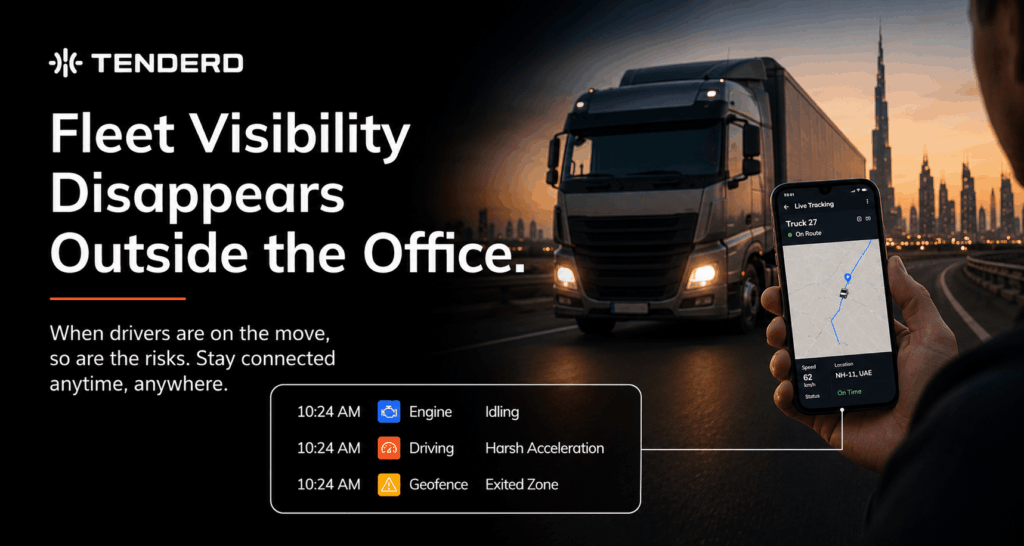
A fleet manager walking a site, driving between locations, or sitting in a client meeting has no way to see that a machine just went offline or a vehicle drifted off its route, because the only screen showing that information is back at the office. This blog covers why visibility that stops at the office door is a real operational risk, not just an inconvenience, and how carrying the same live tracking, alerts, and machine status onto a mobile device keeps that picture constant, wherever the manager actually is.
The Screen That Matters Is Never the One You’re Standing In Front Of
A fleet manager spends a fraction of the workday actually sitting at a desk. Most of it happens walking a site, driving between locations, sitting in a client meeting, or, outside of standard hours, simply at home. That is exactly when something usually needs attention: a machine stops reporting, a vehicle drifts off its assigned route, or a safety event fires somewhere across the fleet. If the only way to see any of that is a desktop dashboard sitting in an empty office, the manager finds out late, secondhand from a phone call, or not until they physically get back to a screen.
That gap is not simply inconvenient. It is where operational risk actually accumulates. A decision about a stalled delivery, a machine flagged for an issue, or a driver behaving unsafely cannot wait for someone to return to a desk. Every minute between an event happening and a manager knowing about it is a minute where the problem is free to get worse, a longer delay for a customer, a longer window for a mechanical issue to compound, a longer exposure to safety risk. For teams managing fleets across multiple sites, or covering shifts outside standard office hours, being tied to one screen in one building simply does not match how the job actually gets done.
Why Does Fleet Visibility Break Down Outside the Office?
Most fleet management tools were built around a desktop-first assumption: a dispatcher or manager sitting at a workstation, watching a dashboard update in real time. That assumption holds for exactly as long as the person stays at that desk. The moment they step away, whether to walk a yard, drive to a second site, or head home after a shift, the connection between them and their fleet’s real-time status is severed. They are not lacking data; the data still exists. They simply have no way to reach it from wherever they actually are.
This becomes a bigger problem the more distributed an operation gets. A single-site manager might tolerate checking a dashboard once they’re back at their desk. A manager covering multiple sites, or a supervisor working a night shift with no one else in the office, cannot afford that lag, because by the time they are back at a screen, the moment to act on what happened has often already passed.
How Do Teams Typically Work Around Desktop-Only Fleet Visibility Today?
Without a mobile-accessible view, most teams fall back on informal, unreliable workarounds:
- Calling the driver or site supervisor directly to ask for a status update, rather than seeing it on a screen.
- Waiting until returning to the office to check what alerts came in during the day.
- Relying on a colleague still at a desk to relay information over a phone call or a messaging app.
- Discovering a problem only when a customer, client, or another manager raises it first.
- Making decisions based on the last known status, which may already be hours out of date by the time it’s acted on.
Each of these workarounds depends on someone else being available and willing to relay information accurately, which is a fragile substitute for actually being able to check it yourself.
What Changes When Fleet Visibility Travels With the Manager?
Real-time fleet visibility from a mobile app closes that gap directly, by putting the same information available at a desk onto the device already in the manager’s pocket. That means live tracking of where every vehicle and machine actually is right now, not a location logged an hour ago. It means alerts arriving the moment something needs attention, rather than being discovered later during a routine check-in back at the office. And it means machine status, whether a piece of equipment is active, idle, or flagged for an issue, being just as visible from a phone on a job site as it would be from a monitor in an office.
The value here is less about any single feature and more about continuity. A manager checking the fleet from a site, a car, or home sees the exact same picture they would see at their desk, so no decision has to wait for a physical return to an office. That constant thread of visibility is what turns a fleet management platform from something used only at the start and end of a shift into something genuinely useful throughout the entire working day, wherever the person managing it happens to be standing.
Desktop-Only Visibility vs. Mobile Fleet Visibility
| Factor | Desktop-Only Visibility | Mobile Fleet Visibility |
| Where it can be checked | Only from a desk with the dashboard open | From a site, a vehicle, or home |
| Time to notice an alert | Whenever someone next opens the dashboard | The moment the alert fires |
| Way to check on a shipment or machine | Phone call to a driver or supervisor | Live map and status on a phone |
| Coverage outside office hours | Effectively none, unless someone is still logged in | Continuous, regardless of shift |
| Dependence on other people | High, relies on someone relaying information | Low, manager can check directly |
Why This Matters More for Multi-Site and Multi-Shift Operations
Fleets running across multiple sites, or operating shifts that extend beyond a typical office day, feel this gap the hardest. A construction fleet manager overseeing several active project sites cannot be physically present at all of them, and a logistics operation running overnight deliveries has no guarantee anyone is sitting at a desk when a delay or an alert happens at two in the morning. In both cases, the person responsible for reacting is almost never the person sitting at the one screen where the information lives, which is exactly the mismatch mobile access is built to remove.
How TENDERD Helps Keep Visibility With the Manager, Not the Desk
TENDERD’s mobile app extends the same real-time visibility available on the TENDERD platform to wherever the person managing the fleet actually is. Live tracking, alerts, and machine status are available directly from a phone, so a manager checking on the fleet from a site, a vehicle, or home sees the same picture they would at a desktop dashboard, without needing to call a driver or wait to get back to an office. The goal is continuity: one consistent view of the fleet, available on whichever screen happens to be in front of the person who needs it.
The Bottom Line
Fleet visibility that only exists inside four walls is really only half a solution, because the moments that matter most rarely happen while a manager is sitting at their desk. Carrying that same live tracking, alerting, and machine status onto a mobile device closes that gap directly, and keeps the manager connected to the fleet on whatever screen happens to be in their hand at the time.
Curious what real-time fleet visibility looks like from your phone instead of your desk? Reach out to the TENDERD team to see the mobile app in action: Book a Demo
Frequently Asked Questions
Why do fleet managers lose visibility when they leave the office?
Most fleet dashboards have historically been built for a desktop screen, so once a manager steps away from that screen, whether onto a site, into a meeting, or home for the evening, they lose the ability to see what their vehicles and machines are doing in real time.
What does real-time fleet visibility from a mobile app actually include?
It typically includes live tracking of vehicle and machine locations, alerts the moment a notable event occurs, and current machine status, all available from a phone rather than only from a desktop dashboard.
How does mobile fleet visibility reduce operational risk?
It shortens the time between something happening in the field, a delay, a stalled machine, a safety event, and the manager actually finding out about it, which means decisions and interventions can happen sooner rather than after the fact.
Is mobile fleet tracking useful for teams with multiple sites or shifts?
Yes. Teams covering multiple locations or shifts outside standard office hours benefit in particular, since visibility is not limited to whoever happens to be at a desk at that moment.
Does a mobile fleet app replace the desktop dashboard?
It extends it rather than replacing it. The goal is for the same real-time picture available on a desktop to also be available on a mobile device, so visibility is continuous regardless of where the manager is.